Tutorial 4 of 8
Products, quotes and VAT
Intermediate 7 min
Keep a product list, build quotes with line items and discounts, let Rapport pick the right EU VAT rule (domestic, reverse charge, One-Stop Shop or export) and download the quote as PDF.
A quote turns a deal into numbers your customer can sign: line items, discounts, VAT and a total, as a clean PDF. Rapport keeps every quote with its deal and on the customer's timeline.
Your company and products
Before the first quote, open CRM → Settings… and fill in Your company on quotes: company name, address, VAT ID, e-mail, phone and IBAN. These appear in the quote header and footer. Your country (VAT) sets the standard rate for domestic sales — the list shows each country with its rate, for example DE · 19 % or FI · 25.5 %. Under Quotes you choose the Number prefix (quotes are numbered Q-2026-0001, Q-2026-0002 …) and how many days a quote stays valid.
CRM → Products… holds the things you sell, each with a name, SKU, price, unit and an optional VAT rate. Leave VAT % (empty = standard) empty for the normal rate; enter a number for reduced rates, such as 7 % for books in Germany.
Make a quote
Open a deal and choose New quote for this deal, or use New → New quote… and pick the deal. Rapport fills in the company, the first contact, today's date, the validity and the customer's country and VAT ID from the company record.
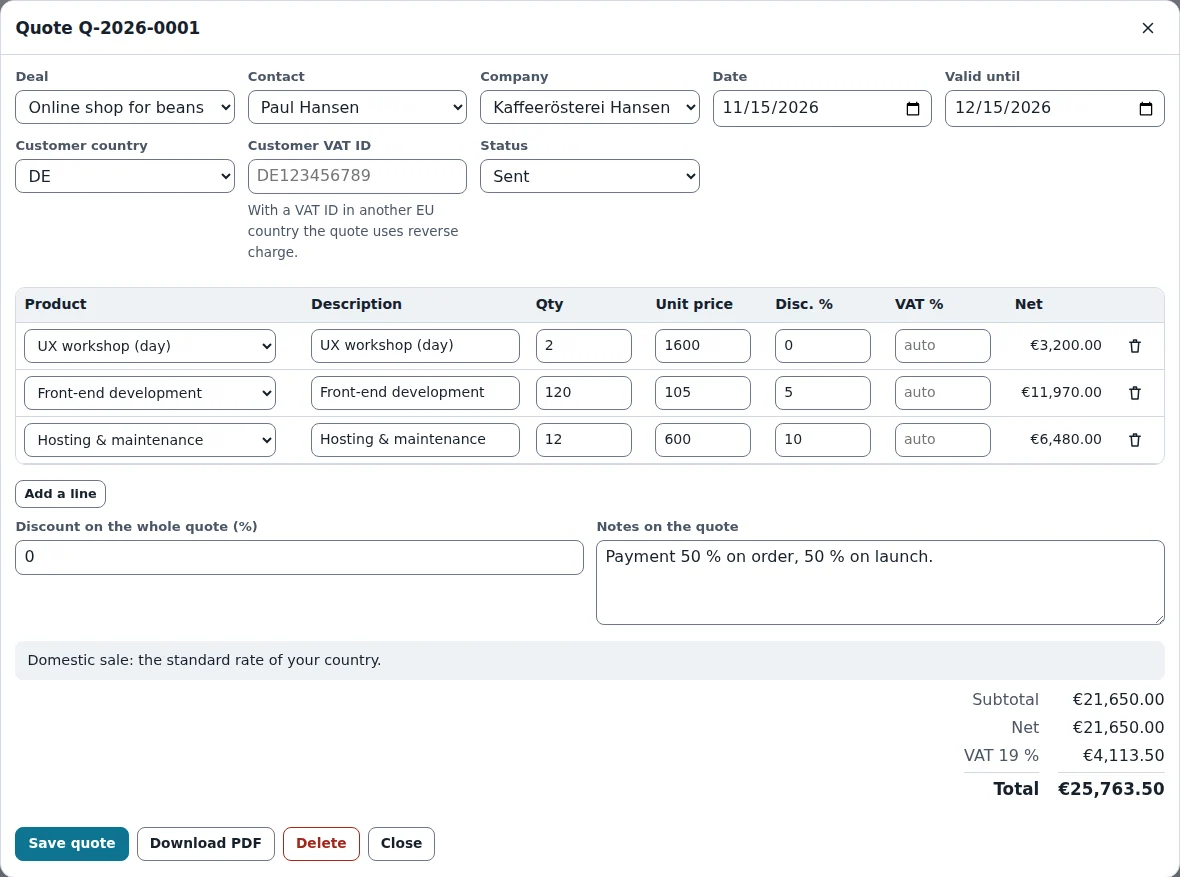
Add lines with Add a line. Pick a Product to copy its description, price and VAT rate, or keep Free text for anything else. Each line has a quantity, unit price, a line discount in percent and its VAT rate; the net amount updates as you type. Discount on the whole quote (%) reduces every line by the same share, and Notes on the quote prints below the totals, for example payment terms.
Which VAT?
Rapport decides from your country, the customer's country and the customer's VAT ID, and explains the rule in a note above the totals:
- Same country — your standard rate (or each product's own rate).
- Business in another EU country with a VAT ID — reverse charge: 0 % and the note “VAT is owed by the recipient (Art. 196 VAT Directive)” on the PDF.
- Consumer in another EU country — your own rate, or with Consumers in other EU countries pay their own country's VAT (One-Stop Shop) switched on in the settings, the customer's country rate.
- Customer outside the EU — no EU VAT.
The totals show the subtotal, the quote discount, the net amount, one VAT row per rate and the total. The standard rates come from the European Commission's overview; special schemes (small businesses, margin scheme) need a manual rate per line, and unusual cases are a question for your tax adviser.
Status and PDF
Set the Status to Draft, Sent, Accepted or Declined as the quote moves on — the Quotes view lists all quotes with their status, net and total. Download PDF writes an A4 quote with your details, the customer, the line table (it continues on a new page with the header repeated when it gets long), the VAT rows and the total. The PDF embeds its fonts, so names such as “Kaffeerösterei Hansen” print exactly as typed.
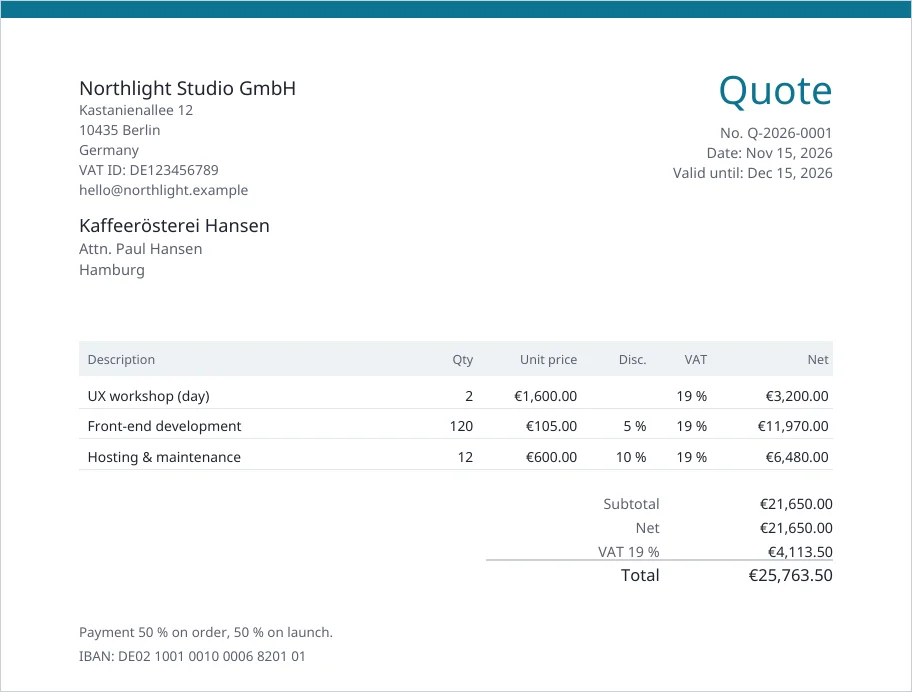
Quotes stay in your CRM file, and in a shared CRM they live in the deal owner's deal book together with the deal.
Ready to try it?