Tutorial 7 of 8
Privacy and the GDPR helpers
Intermediate 6 min
Record the lawful basis and marketing consent of every contact, answer a request for access with one export, erase a person by anonymisation and review old contacts after your retention period.
A CRM is full of personal data, so the GDPR applies to it. Rapport does not make you compliant on its own — your privacy policy and records of processing stay your job — but it keeps the facts you need next to each person and turns the usual requests into a few clicks.
Lawful basis and consent
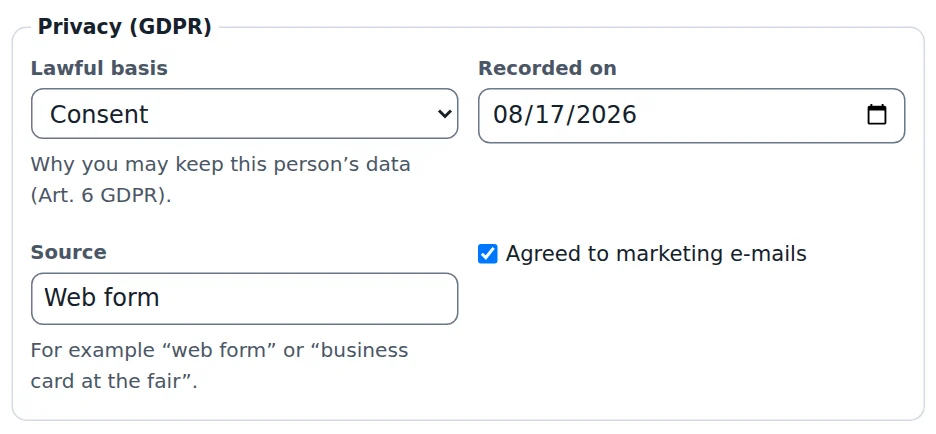
Every contact has a Privacy (GDPR) box in its form:
- Lawful basis — why you may keep this person's data (Art. 6 GDPR): Consent, Contract, Legitimate interest, Legal obligation, Vital interest or Public task. Leave it on Not recorded only while you are still finding out.
- Recorded on — the date you documented it. Rapport fills in today when you choose a basis.
- Source — where it came from, for example “web form” or “business card at the fair”.
- Agreed to marketing e-mails — a separate yes/no for newsletters and campaigns.
The Contacts table shows the lawful basis as a column, and segments can filter by it — for example everyone with marketing consent before you send a newsletter from your mail program. When duplicates are merged, the newest documented consent wins, because it is the person's latest decision.
Right of access (Art. 15)
When someone asks what you store about them, open the contact and click Export this person's data (Art. 15) in the Privacy section of the side panel. Rapport downloads two files:
- a JSON file with the complete record, the company, the deals they are part of (title, value, stage, dates), their activities with texts, quotes, relationships and the timeline
- a short text file that summarises the same in readable form
Send both, or the text file with the JSON as an attachment for completeness.
Right to erasure (Art. 17)
Erase this person (Art. 17)… anonymises the contact after a confirmation: name, e-mail, phone, address, birthday, website, notes, custom fields and consent are removed, and the record keeps only the label “Erased contact” and the date. Activities that were only about this person lose their subject and text; deals and quotes stay but without the person, so your pipeline numbers and sales history remain correct. Export the data first if the person also asked for a copy.
Delete… in the contact form removes the record completely after anonymising it. Both can be undone with Edit → Undo until you close the CRM — after that the data is gone from this CRM. Copies you saved as files or backed up elsewhere need to be handled as well.
Retention review
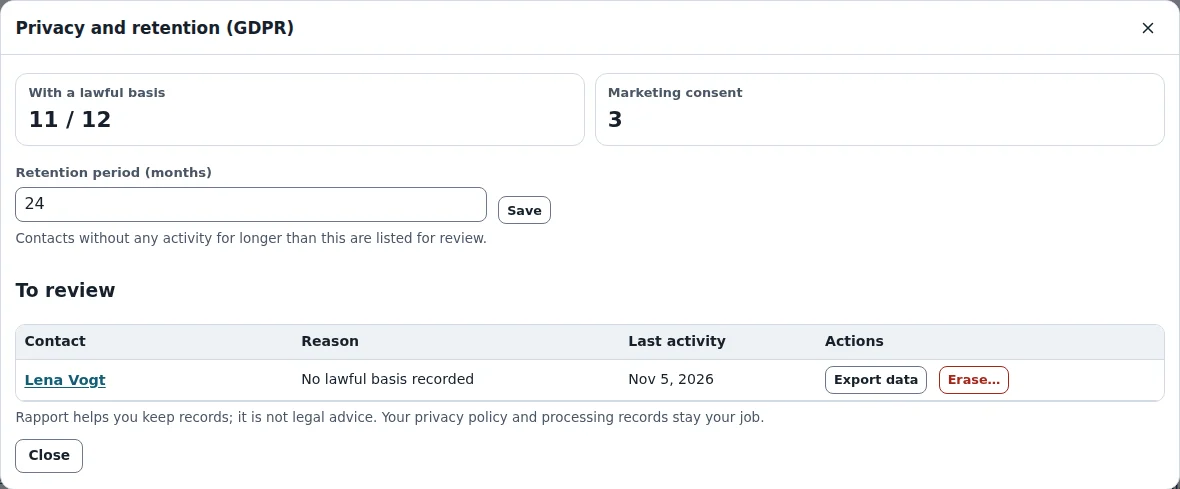
CRM → Privacy and retention (GDPR)… shows how many contacts have a lawful basis and how many agreed to marketing. Set the Retention period (months) — for example 24 — and Rapport lists every contact to review:
- No lawful basis recorded, or
- No activity for 24 months — no done activity, deal change or edit within the period.
Each row has Export data and Erase…, so you can clean up the list in one go. Erased contacts no longer appear.
Shared CRMs
In a workspace, these actions follow the roles: members can export and erase contacts, viewers can only read, and guests see nothing at all. Your workspace's own data (accounts, members) is covered by the site's privacy policy.
Ready to try it?